See Phi
2025-11-03
見出した
概要
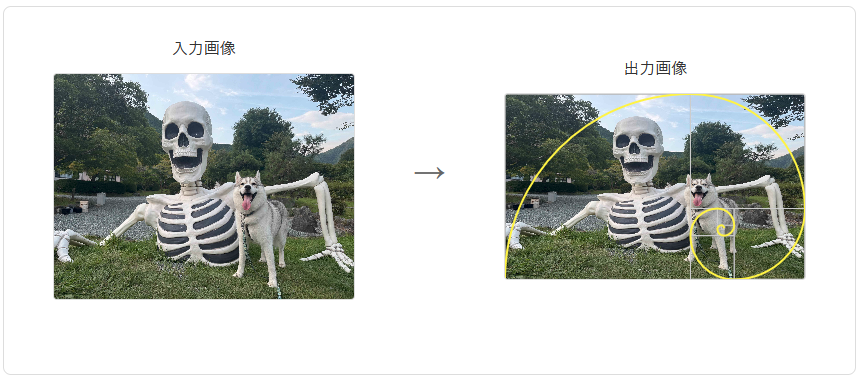
わたしの好きなあの画像はうつくしい。黄金比が隠されているに違いない。
アップロードされた画像を圧縮し、フィボナッチ螺旋を重ねることで黄金比を主張することが可能になる。
実装
1. 画像の黄金比変換
元画像の向き(横長/縦長)を判定し、最大辺を基準に黄金比にリサイズ
const GOLDEN_RATIO = 1.618033988749;

if (originalRatio < 1) {
    // 縦長画像: 縦に圧縮
    goldenWidth = maxSize / GOLDEN_RATIO;
    goldenHeight = maxSize;
} else {
    // 横長画像: 横に圧縮
    goldenWidth = maxSize;
    goldenHeight = maxSize / GOLDEN_RATIO;
}
2. フィボナッチ螺旋の描画
黄金長方形を再帰的に分割し、各正方形に1/4円弧を描くことで螺旋を生成。
// 各長方形に対応する1/4円弧を描く
for (let i = 0; i < rectangles.length; i++) {
    const rect = rectangles[i]!;
    const radius = Math.min(rect.width, rect.height);

    // 長方形内での正方形の位置によって円弧の描画方向を決定
    let centerX, centerY, startAngle, endAngle;

    if (isVertical) {
        // 縦長画像の場合の螺旋(上側→右側→下側→左側)
        switch (i % 4) {
            case 0: // 下側の正方形から上方向へ
                centerX = rect.x + radius;
                centerY = rect.y + rect.height - radius;
                startAngle = 0.5 * Math.PI; // 90° (下方向)
                endAngle = Math.PI; // 180° (左方向)
                break;
            case 1: // 左側の正方形から右方向へ
                centerX = rect.x + radius;
                centerY = rect.y + radius;
                startAngle = Math.PI; // 180° (左方向)
                endAngle = 1.5 * Math.PI; // 270° (下方向)
                break;
            case 2: // 上側の正方形から下方向へ
                centerX = rect.x;
                centerY = rect.y + radius;
                startAngle = 1.5 * Math.PI; // 270° (上方向)
                endAngle = 0; // 0° (左方向)
                break;
            case 3: // 右側の正方形から左方向へ
                centerX = rect.x + rect.width - radius;
                centerY = rect.y;
                startAngle = 0; // 0° (右方向)
                endAngle = 0.5 * Math.PI; // 90° (上方向)
                break;
            default:
                centerX = rect.x;
                centerY = rect.y;
                startAngle = 0;
                endAngle = Math.PI / 2;
        }
    } else {
        // 横長画像の場合の螺旋(左下から線を引き始める)
        switch (i % 4) {
            case 0: // 左下から右上
                centerX = rect.x + radius; // 正方形の右下x座標
                centerY = rect.y + radius; // 正方形の右下y座標
                startAngle = Math.PI; // 180° (左方向)
                endAngle = 1.5 * Math.PI; // 90° (下方向)
                break;
            case 1: // 右下から左上
                centerX = rect.x;
                centerY = rect.y + radius;
                startAngle = 1.5 * Math.PI; // 90° (下方向)
                endAngle = 0; // 0° (右方向)
                break;
            case 2: // 右上から左下
                centerX = rect.x + rect.width - radius;
                centerY = rect.y;
                startAngle = 0; // 0° (右方向)
                endAngle = 0.5 * Math.PI; // -90° (上方向)
                break;
            case 3: // 左上から右下
                centerX = rect.x + radius;
                centerY = rect.y + rect.height - radius;
                startAngle = 0.5 * Math.PI; // -90° (上方向)
                endAngle = Math.PI; // -180° (左方向)
                break;
            default:
                centerX = rect.x;
                centerY = rect.y;
                startAngle = 0;
                endAngle = Math.PI / 2;
        }
    }

    ctx.arc(centerX, centerY, radius, startAngle, endAngle);
}